
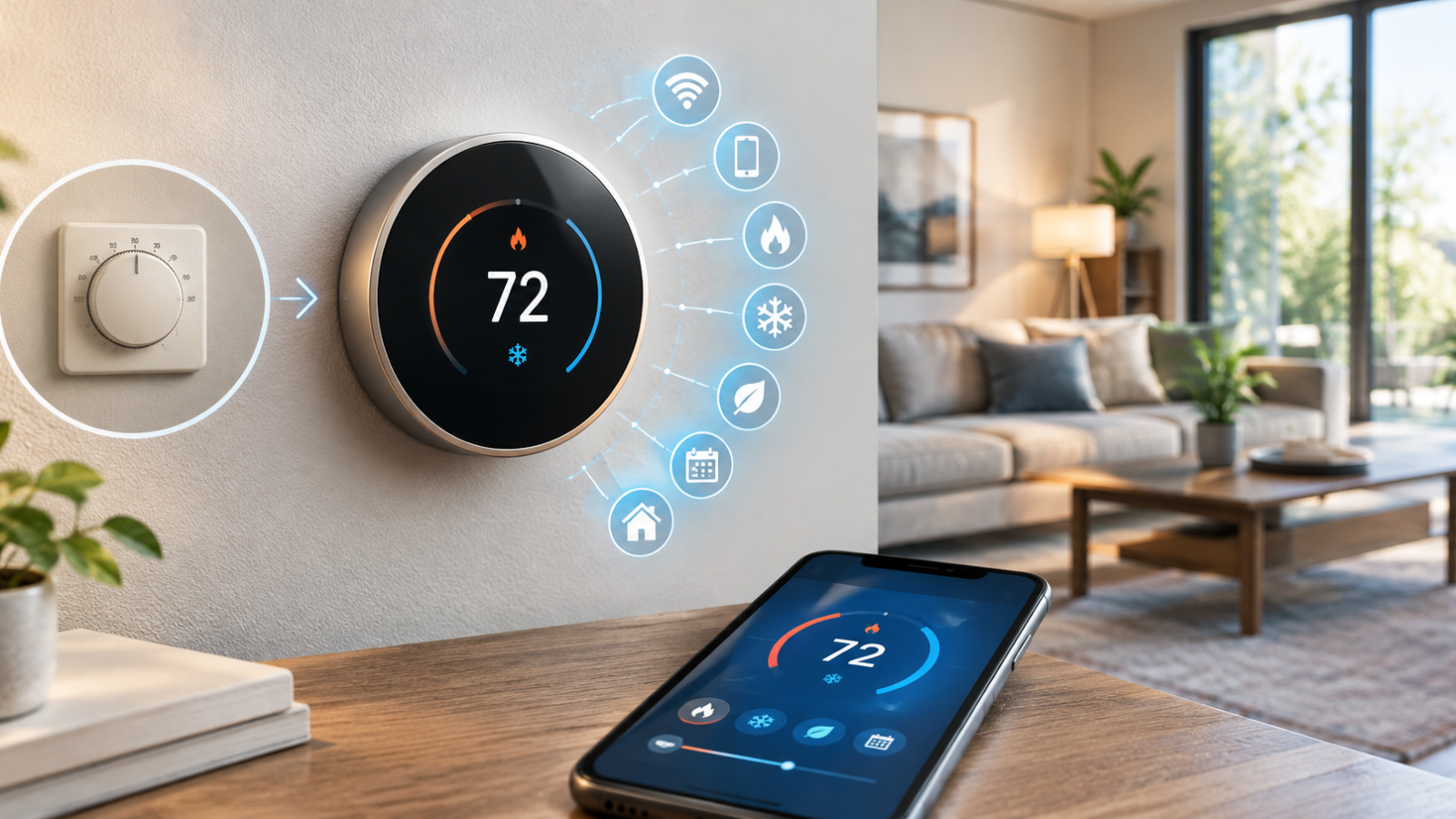
A smart thermostat is a connected thermostat that can automatically manage your home’s heating and cooling using temperature settings, schedules, sensors, mobile apps, and other smart-home features. Unlike a basic thermostat, it can often be controlled remotely and may adjust temperature settings automatically when you’re away.
For homeowners and renters, a smart thermostat can make temperature control more convenient and may help reduce energy waste. However, the actual benefits depend on your HVAC system, climate, home insulation, occupancy, temperature settings, and how you use the device.
What Is a Smart Thermostat?
A smart thermostat is a Wi-Fi-connected or otherwise connected temperature-control device designed to manage a home’s heating and cooling system more intelligently.
A traditional thermostat usually lets you set the desired temperature and, in some cases, create a basic schedule. A smart thermostat adds features such as smartphone control, automatic schedules, occupancy detection, energy reports, geofencing, and smart-home integration.
Some models can also learn household routines. For example, a thermostat may recognize when people usually leave for work or school and adjust the temperature accordingly. Feature availability varies significantly between brands and models.
ENERGY STAR notes that certified smart thermostats can monitor and adjust temperature remotely and automatically reduce heating or cooling when it is not needed.
How Does a Smart Thermostat Work?
A smart thermostat combines temperature sensing, HVAC controls, software, and network connectivity to manage indoor temperature.
Here is the basic process:
- The thermostat measures the temperature. Built-in sensors monitor the temperature around the thermostat.
- You choose temperature settings. These can be adjusted directly on the thermostat or through an app.
- The thermostat communicates with the HVAC system. It tells compatible heating or cooling equipment when to operate.
- Schedules automate temperature changes. You can create different settings for different times of day.
- Sensors can provide additional information. Some models use occupancy or remote temperature sensors.
- The app provides remote control. Depending on the model, you can change settings from your phone.
- Smart-home integrations add automation. Compatible models may work with platforms such as Alexa, Google Home, or Matter-supported systems.
Some smart thermostats also provide energy reports or feedback that can help you understand how your heating and cooling habits affect energy use. ENERGY STAR-certified models have specific requirements for schedules and energy-use feedback.
Smart Thermostat vs Traditional Thermostat
The biggest difference between a smart thermostat and a traditional thermostat is automation and connectivity.
| Feature | Smart Thermostat | Traditional Thermostat |
|---|---|---|
| Wi-Fi connectivity | Usually available | Usually unavailable |
| Mobile app | Often available | Usually unavailable |
| Remote control | Yes, on compatible models | No |
| Scheduling | Advanced scheduling | Basic or model-dependent |
| Learning features | Available on some models | Rare |
| Smart-home integration | Common on compatible models | Rare |
| Energy monitoring | Available on some models | Usually unavailable |
| Ease of use | Designed for automated control | Simple manual control |
Not every smart thermostat includes every feature in this table. Always check the specifications and compatibility information for the particular model.
Key Features of a Smart Thermostat
Remote Temperature Control
A smart thermostat app can let you change your home’s temperature remotely. This is useful when you are away from home or realize you left the heating or air conditioning running.
Programmable Schedules
Scheduling lets you automatically change temperature settings during the day. You might use a more energy-conscious setting while the house is empty and a comfortable setting shortly before people return.
Learning Capabilities
Some models can learn preferred temperatures and routines. Instead of manually programming every change, the thermostat may use previous behavior to help automate temperature control.
Occupancy Detection
Certain smart thermostats use built-in sensors or connected sensors to determine whether a space is occupied. Depending on the device, this information can be used to adjust heating and cooling.
Geofencing
Geofencing uses the location of compatible smartphones or devices to determine whether household members are nearby. A supported thermostat may adjust its settings when everyone leaves or returns.
Energy Reports
Some devices provide reports showing heating and cooling activity. These reports can help you identify patterns and understand when your HVAC system is operating most often.
Smart Alerts
Depending on the model, you may receive notifications about temperature changes, HVAC issues, connectivity problems, filter reminders, or other conditions.
Voice Control
A compatible smart home thermostat may work with voice assistants such as Alexa or Google Home. This can allow you to adjust the temperature without opening the thermostat app.
Benefits of Using a Smart Thermostat
The main smart thermostat benefits are convenience, automation, remote access, and potentially lower energy waste.
A smart thermostat can help you:
- Automatically adjust heating and cooling according to a schedule.
- Change temperature settings when nobody is home.
- Control the HVAC system from a smartphone.
- Monitor energy-related information where supported.
- Integrate temperature control with a wider smart-home setup.
- Reduce the need to remember manual temperature changes.
ENERGY STAR specifically highlights remote control, scheduling, energy reports, and occupancy-based adjustments as useful smart thermostat functions.
However, a smart thermostat is not a guarantee of lower bills. A household that already uses an efficient schedule and carefully manages a traditional thermostat may see a smaller improvement.
Can a Smart Thermostat Save Money?
Yes, a smart thermostat can potentially reduce heating and cooling costs by helping prevent unnecessary HVAC operation, but savings are not guaranteed.
For example, you could use a smart thermostat to reduce heating or cooling while you’re at work, create a daily schedule, or remotely change the temperature when your plans change.
ENERGY STAR-certified smart thermostats are independently evaluated using real-world field data and must meet specific energy-saving criteria. ENERGY STAR currently reports average savings of about 8% of heating and cooling bills, or about $50 per year, for its certified smart thermostats; actual savings vary by home and usage.
That figure should not be treated as a guaranteed result for every household. Climate, HVAC equipment, insulation, occupancy, comfort preferences, energy prices, and thermostat settings can all affect the outcome.
How to Choose the Right Smart Thermostat
Choosing the best smart thermostat starts with compatibility, not features.
Consider these factors before buying:
HVAC Compatibility
Check whether the thermostat supports your heating and cooling equipment. Common systems include furnaces, air conditioners, heat pumps, boilers, and radiant systems, but compatibility varies.
C-Wire Requirements
Some smart thermostats need a C-wire, also called a common wire, to provide continuous power. Others can operate without one in certain installations or use a compatible power accessory.
For example, Google says some Nest installations may require a C-wire or Nest Power Connector depending on the system.
System Type
Pay particular attention if you have a heat pump, multi-stage system, boiler, dual-fuel setup, or another specialized HVAC configuration.
Wi-Fi and App Quality
A good smart thermostat should have a reliable app and straightforward controls. Check which Wi-Fi requirements and mobile platforms the thermostat supports.
Smart-Home Compatibility
Check whether the thermostat works with your preferred ecosystem, such as Alexa, Google Home, Apple Home, or Matter where supported.
Sensors and Automation
Remote sensors, occupancy detection, geofencing, learning functions, and advanced schedules can be valuable if you want more automation.
Price and Warranty
Compare the purchase price with the features you will actually use. Also check the manufacturer’s warranty and installation requirements.
Before purchasing, use the manufacturer’s compatibility checker whenever one is available. Google, for example, provides a compatibility checker and installation guidance for Nest thermostats.
How to Install a Smart Thermostat
Smart thermostat installation should always follow the manufacturer’s instructions and your HVAC system’s requirements.
For a compatible standard system, the general process is:
- Turn off HVAC power. Switch off power to the heating and cooling equipment before working with thermostat wiring.
- Remove the old thermostat carefully. Keep track of how it was connected.
- Label the wires. Use the manufacturer’s labels or another clear method so each wire can be identified.
- Confirm compatibility. Make sure the selected thermostat supports your HVAC system and wiring.
- Install the mounting plate. Secure it according to the manufacturer’s instructions.
- Connect the wires. Match each wire to the correct terminal shown in the installation guide.
- Attach the thermostat. Secure the thermostat to its base.
- Restore power.
- Connect to Wi-Fi when prompted.
- Complete setup in the app.
- Test heating and cooling to make sure the system responds correctly.
Safety note: Never guess when dealing with HVAC wiring. If the system uses unusual wiring, multiple transformers, specialized controls, or a heat-pump or dual-fuel configuration you are unsure about, contact a qualified HVAC professional.
Google also recommends professional installation for certain complex systems, including some dual-fuel and multi-transformer configurations.
How to Set Up a Smart Thermostat for Better Energy Efficiency
Installing a smart thermostat is only part of the process. Your settings matter too.
Start by creating a schedule that matches your actual routine. Reduce unnecessary heating or cooling when the house is empty, but avoid settings that sacrifice reasonable comfort.
You can also:
- Enable an available eco or energy-saving mode.
- Turn on occupancy detection when it fits your household.
- Use remote sensors to improve temperature awareness in different areas.
- Review energy reports when your thermostat provides them.
- Use geofencing if it works reliably for your household.
- Adjust vacation settings when you will be away for an extended period.
- Avoid constantly overriding an automated schedule without a reason.
The goal is not to make extreme temperature changes. It is to prevent the HVAC system from running unnecessarily.
Smart Thermostat Compatibility
Compatibility is one of the most important parts of choosing a smart thermostat.
A thermostat may support common HVAC equipment such as:
- Furnaces
- Central air conditioners
- Heat pumps
- Boilers
- Radiant heating
- Multi-stage heating and cooling
- Dual-fuel systems
But support differs between individual models.
A C-wire requirement is another important consideration. A C-wire supplies continuous power to many thermostats, although some smart thermostats are designed to operate without one in certain systems. Google notes that some Nest installations require a C-wire or power accessory, while others do not.
Do not assume that a thermostat will work simply because your old thermostat does. Check the manufacturer’s compatibility tool before purchase and before changing wiring.
Smart Thermostat Troubleshooting
Smart thermostats can occasionally experience connection or HVAC-control problems.
Thermostat Not Connecting to Wi-Fi
Check that your home network is working, confirm the thermostat is within suitable range, and follow the manufacturer’s connection steps. Restarting the thermostat or router may help with temporary network problems.
Thermostat Losing Power
A recurring power problem can be related to HVAC compatibility or insufficient thermostat power. Some systems may need a C-wire or compatible power accessory.
HVAC Not Turning On
First check the thermostat’s mode and temperature setting. Then check whether the HVAC system itself has power and whether another system control is preventing operation.
Incorrect Temperature Reading
Make sure the thermostat is installed away from unusual heat sources, direct sunlight, drafts, and other conditions that could affect its sensor reading.
App Connection Problems
Check your internet connection, app status, account connection, and thermostat network settings.
Thermostat Not Following the Schedule
Review the programmed schedule, temporary overrides, occupancy settings, and eco modes. Some smart thermostats may change behavior based on automation settings.
Are Smart Thermostats Worth It?
For many households, a smart thermostat can be worth it, especially when remote control and automation are useful.
It may be a good choice when you:
- Have regular periods when the home is empty.
- Want smartphone temperature control.
- Already use other smart-home devices.
- Want more advanced scheduling.
- Like viewing energy-related reports.
- Want occupancy or geofencing features.
A traditional programmable thermostat may be sufficient when you prefer simple controls, already maintain an effective schedule, or do not need Wi-Fi and smart-home features.
The best choice depends on your HVAC system, budget, comfort preferences, and how much automation you actually want.
Frequently Asked Questions About Smart Thermostats
What is a smart thermostat?
A smart thermostat is a connected thermostat that can control heating and cooling while offering features such as app control, scheduling, automation, sensors, and smart-home integration. Compared with a basic thermostat, it provides more ways to manage temperature and, on some models, monitor energy-related information.
How does a smart thermostat work?
A smart thermostat measures indoor temperature and communicates with a compatible HVAC system to control heating and cooling. Depending on the model, it can also use schedules, sensors, occupancy information, geofencing, and app commands to make automatic temperature adjustments.
Does a smart thermostat save electricity?
It can help reduce electricity or energy use, but savings vary. Automatic schedules, away settings, occupancy detection, and remote control can reduce unnecessary heating and cooling. ENERGY STAR-certified models have demonstrated savings using field data, but results depend on equipment, climate, settings, and household behavior.
Are smart thermostats worth it?
They can be worth it when you will use their smart features. Remote access, automation, schedules, sensors, and energy feedback can add convenience and potentially reduce wasted heating and cooling. If you only need basic temperature scheduling, a programmable thermostat may provide enough functionality at a lower cost.
Can I install a smart thermostat myself?
Some compatible installations can be handled by homeowners, but not every system is suitable for DIY installation. Always follow the manufacturer’s wiring instructions. Complex HVAC systems, unusual wiring, dual-fuel systems, and uncertain compatibility are good reasons to use a qualified HVAC professional.
Does a smart thermostat need Wi-Fi?
Most smart thermostats use Wi-Fi or another network connection for their connected features, but the exact requirements vary. Wi-Fi is commonly used for smartphone access, remote control, updates, and smart-home integration. Some thermostat functions may continue to work without an internet connection.
Do smart thermostats need a C-wire?
Not always. Some models can operate without a C-wire in compatible systems, while others require continuous power from a common wire or a manufacturer-approved power accessory. Requirements depend on both the thermostat and HVAC system, so check the manufacturer’s compatibility information first.
Can a smart thermostat work with any HVAC system?
No. Smart thermostats are not universally compatible with every heating and cooling system. Compatibility can depend on system type, voltage, wiring, number of stages, heat-pump configuration, and other controls. Always use the manufacturer’s compatibility checker before buying.
Can I control a smart thermostat from my phone?
Yes, many smart thermostats support smartphone control through a dedicated app. Depending on the model, you may be able to change temperatures, create schedules, review energy information, receive alerts, and adjust settings while away from home. ENERGY STAR highlights remote control as a key smart thermostat capability.
What is the difference between a smart thermostat and a programmable thermostat?
A programmable thermostat mainly automates scheduled temperature changes, while a smart thermostat typically adds connectivity and advanced automation. Smart models may include smartphone control, occupancy detection, learning features, geofencing, energy reports, and smart-home integration. Features vary between models.
Final Verdict
A smart thermostat gives you a more connected way to manage heating and cooling. Its biggest advantages are automatic scheduling, remote temperature control, sensors, smart-home integration, and the potential to reduce unnecessary HVAC operation.
It can be especially useful for homeowners who have changing schedules, spend time away from home, or want more control over their home’s temperature from a phone.
Before purchasing or installing one, check smart thermostat compatibility, C-wire requirements, HVAC system type, network requirements, and available smart-home integrations. With the right system and sensible settings, a smart thermostat can help reduce energy waste while making everyday temperature control easier.