
When you build or buy a PC, you will often see terms such as CPU, motherboard, socket, RAM, PCIe, and chipset. While most people understand what a CPU and motherboard are, the motherboard chipset can be a little confusing.
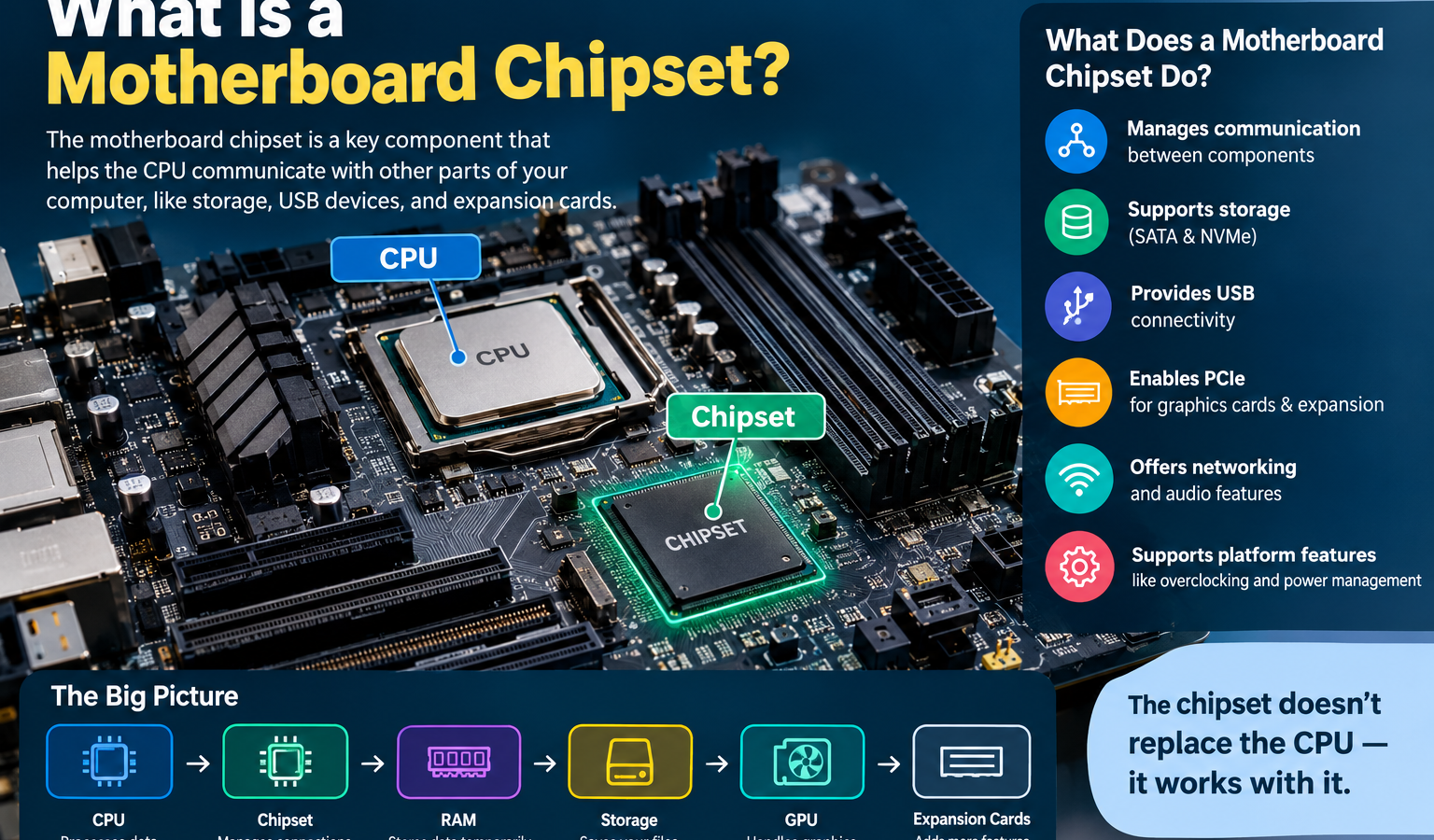
So, what is a motherboard chipset? A motherboard chipset is a collection of platform-control functions that helps determine how the processor works with storage, USB devices, expansion hardware, and other motherboard features. On modern PCs, some functions that used to belong to the chipset are integrated directly into the CPU, while the remaining platform functions are handled by the motherboard chipset.
The chipset does not replace the processor or make your CPU perform calculations. Instead, it helps define the motherboard’s connectivity, expansion capabilities, and supported platform features.
Think of it as a traffic controller for the motherboard. The CPU does the computing, the motherboard provides the physical platform, and the chipset helps organize many of the supported connections and features.
What Is a Motherboard Chipset?
A motherboard chipset is a hardware controller or collection of controllers on a motherboard that manages and enables many of the platform’s input/output and connectivity functions.
In simple terms, the chipset helps the motherboard communicate with devices such as:
- USB peripherals
- SATA storage
- NVMe storage
- Expansion cards
- Network hardware
- Audio devices
- Other motherboard components
The exact job of the chipset depends on the CPU platform and chipset generation.
Older computers commonly used a northbridge and southbridge architecture. The northbridge traditionally handled high-speed communication involving the CPU, memory, and graphics, while the southbridge handled slower I/O functions.
Modern PC platforms are different. Many functions that were historically handled by the northbridge have moved into the CPU itself. Depending on the platform, the processor may contain the memory controller and direct PCIe connectivity, while the motherboard chipset handles additional I/O and expansion capabilities.
That is why a modern chipset should not simply be thought of as an old-style central controller for every component.
What Does a Motherboard Chipset Do?
The motherboard chipset helps determine which features a motherboard can support. However, the exact capabilities depend on the CPU, chipset, motherboard design, and manufacturer implementation.
Common chipset-related functions include:
Communication Between Components
The chipset provides additional communication pathways between the processor and motherboard-connected devices.
It helps the platform support different types of I/O, allowing components such as storage devices, USB hardware, and expansion cards to work together.
Storage Connectivity
Chipsets can provide support for additional:
- SATA ports
- M.2 interfaces
- NVMe storage
- Storage expansion
- RAID features on supported platforms
A motherboard manufacturer can then use these capabilities to create different board designs.
USB Connectivity
Chipset capabilities can influence how many USB connections a motherboard can provide and which USB speeds are supported.
However, the actual number and type of USB ports visible on the rear I/O panel also depend on the motherboard manufacturer’s design.
PCIe Support
PCI Express, or PCIe, is used for high-speed devices such as graphics cards, NVMe SSDs, and expansion cards.
Modern platforms can have PCIe lanes directly connected to the processor as well as additional lanes supplied through the chipset.
This distinction is important because CPU-connected PCIe lanes and chipset-connected lanes can serve different purposes.
Expansion Support
A higher-end chipset may provide more I/O resources and expansion options, giving motherboard manufacturers more flexibility.
That can be useful for users who need multiple SSDs, expansion cards, additional USB ports, or other peripherals.
Networking and Audio
Networking and audio are often associated with the motherboard as a whole rather than the chipset alone.
The chipset may provide platform support, while the motherboard manufacturer adds separate networking and audio controllers to create the final feature set.
This is an important distinction: the chipset name does not automatically tell you everything the motherboard has.
Overclocking Support
Some chipset families provide more advanced CPU or memory tuning features than others.
Whether overclocking is possible depends on the CPU, motherboard, chipset, BIOS/UEFI, power delivery, and cooling solution.
For example, current Intel desktop chipsets such as the Z890 support processor-related overclocking and memory overclocking, while the B860 supports memory overclocking but not the same level of processor overclocking.
How Does a Motherboard Chipset Work?
A simplified way to understand a modern PC platform is:
CPU → Motherboard Platform → Chipset → Additional Devices and I/O
However, this does not mean every device communicates through the chipset.
Modern processors often have direct connections to critical components. Depending on the platform, these may include:
- Memory
- Graphics
- NVMe storage
- Other high-speed PCIe devices
The chipset then provides additional connectivity for other motherboard resources.
For example, a processor may provide direct PCIe connectivity for a graphics card and one or more NVMe drives, while the chipset provides additional PCIe lanes for secondary storage, expansion cards, or other devices.
The exact arrangement differs between processor generations.
This is why older diagrams showing every major component connected through a traditional northbridge are no longer accurate for modern desktop PCs.
CPU vs Motherboard Chipset
The CPU and chipset work together, but they have very different jobs.
| Feature | CPU | Motherboard Chipset |
|---|---|---|
| Main role | Processes instructions and performs calculations | Provides additional platform I/O and connectivity |
| Performs calculations | Yes | No |
| Manages supported I/O/features | Some, especially through integrated controllers | Yes, for many additional platform functions |
| Integrated graphics | Available on some CPUs | No |
| Memory controller | Commonly integrated into modern CPUs | Platform support rather than primary memory control |
| Expansion support | Provides some direct PCIe connectivity | Provides additional chipset-connected expansion |
| Overclocking support | CPU must support the feature | Chipset and motherboard must support the feature |
| Location | Installed in the CPU socket | Located on the motherboard |
The easiest way to remember it is:
CPU = processing
Chipset = platform connectivity and features
Motherboard = the physical platform that connects everything
The chipset therefore does not replace the CPU.
Motherboard Chipset vs Motherboard
These terms are related, but they are not the same thing.
Motherboard
The motherboard is the large circuit board that connects the CPU, memory, storage, expansion cards, power, USB ports, networking hardware, and other components.
Chipset
The chipset is a component or collection of platform-control functions that provides and manages certain I/O and connectivity capabilities.
CPU
The CPU is the processor responsible for executing instructions and performing calculations.
BIOS/UEFI
BIOS or UEFI is firmware that initializes hardware and provides the interface and low-level instructions required to start and configure the system.
A useful analogy is a city:
Motherboard = city infrastructure
CPU = main computing worker
Chipset = traffic and service coordinator
BIOS/UEFI = startup and configuration system
Each has a different role.
Types of Motherboard Chipsets
Chipsets are commonly positioned into different market categories.
Names vary by manufacturer and generation, but you will often find something similar to:
Entry-Level Chipsets
Entry-level chipsets are designed for users who want essential functionality at a lower price.
They may have fewer expansion options, fewer high-speed I/O resources, and fewer advanced tuning features.
They can be an excellent choice for basic home, school, or office PCs.
Mainstream Chipsets
Mainstream chipsets usually target the largest group of PC builders.
They often provide a balance of:
- Price
- Expansion
- Storage
- USB connectivity
- Memory support
- Upgrade potential
For many users, this is the best value category.
Performance Chipsets
Performance-oriented chipsets generally provide more platform resources and advanced features.
They can be useful for gaming systems, content creation PCs, and enthusiast builds that need more storage, expansion, or tuning options.
Enthusiast Chipsets
Enthusiast chipsets are designed for users who want maximum platform flexibility.
They may provide more PCIe connectivity, more I/O, stronger overclocking support where applicable, and broader expansion capabilities.
However, a more expensive chipset does not automatically make your CPU faster.
Intel Motherboard Chipsets
Intel uses different chipset families for different desktop platforms.
The current Intel 800-series desktop lineup includes chipsets such as Z890, B860, and H810. Intel’s official specifications show meaningful differences in I/O, PCIe connectivity, USB support, and overclocking capabilities between these models.
Intel Z-Series
The Z-series generally targets higher-end and enthusiast systems.
For the current Z890 platform, Intel lists support for processor-related overclocking, BCLK tuning, and memory overclocking. It also provides more chipset I/O resources than B860 or H810.
This makes Z-series boards attractive to enthusiasts and users who want advanced tuning and extensive connectivity.
Intel B-Series
The B-series generally targets mainstream PCs.
For example, Intel’s B860 chipset supports memory overclocking and provides up to 14 chipset PCIe lanes, along with extensive USB connectivity depending on the motherboard implementation.
For many gamers and everyday PC builders, a B-series motherboard can provide an excellent balance between features and cost.
Intel H-Series
H-series chipsets are generally aimed at users who need essential platform features without enthusiast-level tuning.
The current H810 chipset, for example, does not support processor or memory overclocking in Intel’s listed chipset capabilities and provides fewer chipset PCIe lanes than B860 or Z890.
The exact meaning of an H-series chipset can differ between generations, so always check the specifications for the specific CPU platform.
AMD Motherboard Chipsets
AMD also offers different chipset families for different levels of performance and features.
For the current Socket AM5 platform, AMD lists chipsets including X870E, X870, B850, B840, X670E, X670, and A620/A620A. AMD states that Socket AM5 motherboards support Ryzen 7000, 8000, and 9000 processors, although BIOS updates may be required for newer processors on some older 600-series boards.
AMD X-Series
The X-series generally targets high-performance and enthusiast systems.
For example, X870E supports extensive PCIe connectivity, USB 4, CPU overclocking, and DDR5 memory overclocking. X870 also supports CPU overclocking and USB 4 while offering a somewhat different I/O configuration.
AMD B-Series
B-series chipsets are generally aimed at mainstream gaming and performance builds.
The B850 supports CPU overclocking, DDR5 memory with EXPO, and PCIe 5.0 connectivity for NVMe storage.
This makes the B-series a strong option for users who want many modern features without moving to the highest-end chipset.
AMD A-Series
AMD’s A-series generally focuses on entry-level and essential platform functionality.
For example, AMD lists A620/A620A as entry-level AM5 options with DDR5 memory support and no Ryzen processor overclocking.
Chipset Compatibility
Chipset compatibility is one of the most important things to check before buying a motherboard.
A motherboard and CPU need to work together at several levels.
CPU Socket
The processor needs to physically fit the motherboard socket.
But matching the socket alone is not always enough.
CPU Generation
A socket can be used across multiple processor generations, but motherboard support can still depend on the specific CPU generation.
BIOS/UEFI Support
A motherboard may need a BIOS or UEFI update before it can boot with a particular processor.
This is especially important when installing a newer CPU on an older motherboard.
Chipset Support
The chipset determines many of the platform features available to the motherboard, but motherboard manufacturers may implement those features differently.
Memory Generation
You also need to check whether the motherboard uses compatible memory such as DDR4 or DDR5.
Do not assume the chipset name alone tells you the complete memory configuration.
PCIe Generation
The platform may support different PCIe generations for different devices.
You should check whether the motherboard provides the PCIe version and lane configuration required by your graphics card, SSD, or expansion hardware.
Upgrade Compatibility
Before buying a motherboard, consider what CPU you may want to use later.
This can help you avoid choosing a motherboard that works today but limits your upgrade options.
Does a Motherboard Chipset Affect Gaming Performance?
Usually, the chipset does not directly determine gaming performance in the same way the CPU and GPU do.
A gaming PC with a high-end chipset does not automatically produce higher frame rates than the same CPU and GPU installed on a mainstream chipset.
However, the chipset can affect the platform features around the CPU and GPU.
For example, chipset choice may influence:
- Expansion options
- Additional PCIe lanes
- Storage connectivity
- USB connectivity
- Memory-related features
- Overclocking support
- Upgrade flexibility
For gamers, the practical question is therefore not simply “Which chipset is fastest?”
Instead, ask:
Does this chipset provide the features my gaming PC actually needs?
A mainstream chipset may be the better choice when you only need one graphics card, one or two SSDs, several USB devices, and normal memory support.
Does the Chipset Affect CPU Performance?
The chipset can affect CPU performance indirectly, but it is not responsible for the CPU’s basic processing power.
CPU performance is influenced primarily by factors such as:
- CPU architecture
- Core count
- Thread count
- Clock frequency
- Cache
- Power limits
- Cooling
- CPU design
GPU performance is also important for gaming.
The chipset matters when it enables or limits features such as overclocking, power management, memory configuration, or connectivity.
For example, a chipset that supports CPU overclocking may allow a compatible processor and motherboard to operate differently from a platform without that capability.
Still, a more expensive chipset does not magically add CPU cores or make the processor’s architecture faster.
Does the Chipset Affect Overclocking?
It can.
Overclocking means operating hardware above its standard rated settings to potentially increase performance.
For CPU overclocking to work, several things have to line up:
- The CPU must support the relevant tuning feature.
- The motherboard must support it.
- The chipset must allow the required functionality.
- BIOS/UEFI must provide the necessary controls.
- The motherboard must have suitable power delivery.
- Cooling must be capable of handling the increased heat.
Therefore, buying an expensive motherboard does not automatically mean you can overclock any CPU.
Intel’s current Z890 platform, for example, supports processor-related and memory overclocking, while B860 supports memory overclocking but not the same level of processor overclocking.
AMD’s AM5 X870, X870E, and B850 platforms also support CPU overclocking, while B840 and A620 are more limited.
Motherboard Chipset and RAM
RAM compatibility depends on the entire platform, not simply the chipset name.
You need to consider:
- CPU memory controller
- Motherboard design
- Chipset and platform generation
- DDR4 or DDR5 support
- Maximum supported capacity
- Memory speed
- BIOS/UEFI support
Modern desktop CPUs commonly include the memory controller directly in the processor.
That means the chipset is not the only factor determining memory compatibility.
For example, moving from DDR4 to DDR5 is not simply a matter of selecting a different chipset. The CPU platform and motherboard must be designed to support the appropriate memory technology.
Motherboard Chipset and PCIe
PCIe, or Peripheral Component Interconnect Express, is a high-speed interface used to connect devices to a PC.
Common PCIe devices include:
- Graphics cards
- NVMe SSDs
- Network adapters
- Capture cards
- Sound cards
- Other expansion hardware
Modern systems can have CPU-provided PCIe lanes and chipset-provided PCIe lanes.
This is an important distinction.
For example, the graphics card may receive direct PCIe connectivity from the CPU, while additional M.2 storage or expansion cards connect through chipset-provided lanes.
The exact lane arrangement depends on the processor and motherboard platform.
Motherboard Chipset and Storage
The chipset can have a significant impact on storage expansion.
A motherboard may provide connections for:
SATA Drives
Traditional SATA ports are commonly used for 2.5-inch SSDs and hard drives.
NVMe SSDs
NVMe SSDs typically use PCIe and can provide much higher bandwidth than SATA-based storage.
Additional M.2 Slots
Some motherboards provide multiple M.2 slots for several NVMe drives.
However, adding more M.2 slots can also affect which PCIe lanes are available elsewhere, depending on the motherboard design.
RAID
Some platforms support RAID-related storage configurations, although the exact capabilities vary by chipset, firmware, and motherboard.
This is another reason why looking only at the chipset name is not enough. Always inspect the motherboard’s actual specifications.
Motherboard Chipset and USB
USB connectivity varies widely between motherboard models.
A chipset can provide certain USB capabilities, but the motherboard manufacturer decides how those capabilities are implemented.
You may encounter:
- USB-A
- USB-C
- USB 3.x
- High-speed USB
- Front-panel USB headers
For example, Intel’s B860 chipset supports USB 3.2 connectivity with multiple possible speed configurations, but the final motherboard port layout depends on the board design.
So when comparing motherboards, check the actual I/O specifications rather than assuming two boards with the same chipset have identical USB ports.
How to Choose the Right Motherboard Chipset
The best motherboard chipset depends on your CPU, budget, required features, and upgrade plans.
Basic PC Users
For web browsing, streaming, schoolwork, and everyday tasks, you usually do not need a premium chipset.
Focus on:
- CPU compatibility
- Enough RAM support
- Required USB ports
- Storage options
- Reliability
- Price
Buying a high-end chipset simply for basic tasks can waste money.
Office and Productivity Users
Office systems should prioritize reliability and useful connectivity.
Consider:
- Number of USB ports
- Networking
- Display outputs
- Storage expansion
- Memory capacity
- Long-term platform support
You may benefit more from a well-designed mainstream motherboard than from enthusiast-level features.
Gamers
Gamers should look at:
- CPU compatibility
- GPU PCIe support
- M.2 storage
- RAM support
- USB connectivity
- Expansion options
- Future CPU upgrades
A mainstream chipset is often enough for a gaming PC unless you need specific advanced features.
Content Creators
Content creators may benefit from additional expansion and connectivity.
Pay attention to:
- Multiple NVMe drives
- Large memory capacity
- USB bandwidth
- PCIe expansion
- Networking
- Storage flexibility
A motherboard with more platform resources can be valuable when using several high-speed devices.
Enthusiasts
Enthusiast users may need:
- CPU overclocking
- Memory tuning
- More expansion
- More storage
- Advanced BIOS controls
- Additional PCIe connectivity
- More USB connectivity
This is where a higher-end chipset can make more sense.
Common Motherboard Chipset Mistakes
Choosing a chipset becomes much easier when you avoid a few common mistakes.
Choosing a Chipset Without Checking CPU Compatibility
A motherboard needs to support your specific processor, not merely a similar processor family.
Assuming Expensive Means Faster
A more expensive chipset usually means more features, not automatically more CPU or GPU performance.
Ignoring BIOS Support
Older boards can sometimes require a BIOS update for newer processors.
Buying More Features Than You Need
Do not pay for advanced overclocking, extra PCIe lanes, or extensive I/O when you will never use them.
Forgetting Memory Compatibility
Check DDR generation, memory capacity, and motherboard specifications before purchasing RAM.
Ignoring PCIe Lanes
If you plan to use several NVMe drives or expansion cards, verify how PCIe lanes are distributed.
Not Checking M.2 and USB Requirements
Two motherboards with the same chipset can have very different numbers of M.2 slots and USB ports.
Always read the motherboard’s complete specification sheet.
Motherboard Chipset FAQs
What is a motherboard chipset?
A motherboard chipset is a set of platform-control functions that helps provide connectivity and I/O features between the processor and devices such as storage, USB hardware, and expansion cards. Modern CPUs also contain functions that older chipsets once handled, so today’s chipset architecture is more distributed.
What does a motherboard chipset do?
A motherboard chipset helps provide additional platform connectivity for devices such as USB peripherals, SATA storage, PCIe expansion cards, and other motherboard resources. The exact features depend on the CPU platform, chipset generation, and motherboard design.
Is a chipset the same as a CPU?
No. The CPU is the main processor that executes instructions and performs calculations. The motherboard chipset primarily provides platform I/O and connectivity features. Modern CPUs also contain some functions that historically belonged to separate chipset components.
Does the chipset affect gaming performance?
The chipset normally does not directly determine gaming frame rates. CPU and GPU performance are usually more important. However, the chipset can affect expansion, storage, PCIe connectivity, memory-related features, USB connectivity, and overclocking support, which can influence how flexible a gaming PC is.
Does the chipset affect CPU speed?
The chipset does not directly determine the CPU’s basic clock speed or processing architecture. CPU speed depends mainly on the processor itself, including its architecture, clocks, cores, cache, power limits, and cooling. The chipset can matter indirectly by supporting features such as CPU overclocking.
Can I change the motherboard chipset?
Normally, you cannot simply replace a motherboard chipset like you would replace RAM or an SSD. The chipset is integrated into the motherboard’s platform design. To move to a different chipset, you generally need a different motherboard, and possibly a different CPU depending on compatibility.
How do I know which chipset my motherboard has?
You can find the chipset in your motherboard’s product specifications or manual. You can also identify the motherboard model in Windows or system-information tools and then check the manufacturer’s official product page for its chipset.
Which motherboard chipset is best?
There is no single best chipset for everyone. The right choice depends on your CPU, budget, required storage, PCIe expansion, USB connectivity, memory requirements, overclocking plans, and upgrade goals. Mainstream chipsets are often ideal for typical users, while higher-end chipsets are useful for advanced builds.
Does the chipset determine RAM compatibility?
Not by itself. RAM compatibility depends on the entire platform, including the CPU’s memory controller, motherboard design, BIOS/UEFI, memory generation, and supported speeds. Always check the motherboard and processor specifications rather than relying only on the chipset name.
Does a better chipset make a PC faster?
Not automatically. A higher-end chipset usually provides more features, connectivity, and expansion options rather than directly increasing CPU or GPU performance. A better chipset becomes valuable when you need those additional capabilities.
Final Verdict
So, what is a motherboard chipset?
A motherboard chipset is part of the PC platform that helps provide and manage many of the motherboard’s connectivity and I/O features.
The easiest way to understand the relationship is:
CPU = processes instructions
Motherboard = connects the PC’s components
Chipset = provides additional platform connectivity and supported features
BIOS/UEFI = initializes and configures the hardware
Modern CPU platforms have changed significantly from the old northbridge/southbridge design. Many functions are now integrated directly into the processor, while the motherboard chipset handles additional I/O and expansion capabilities.
When choosing a motherboard, do not simply look for the most expensive chipset. Instead, choose a platform that matches your CPU, budget, memory, storage, expansion requirements, and future upgrade plans.
The right chipset is the one that gives you the features you actually need without paying for capabilities you will never use.